12 min read
Internal linking for SEO: the complete guide
Of everything that affects how a site performs in search, internal linking is among the few parts entirely within your control. You do not have to earn it from anyone, you do not have to wait for it, and no algorithm update takes it away. It is also among the most neglected, because it decays quietly: every post you publish links back to a few older ones you happen to remember, and the rest slowly fall out of the structure.
This guide explains the mechanism and cites the sources. It does not promise what any change will do to a ranking, because no one can honestly promise that. What it can do is show you how internal links work, why search engines rely on them, how to structure them well, and how to keep them healthy as your site grows.
Key takeaways
- Internal linking is the SEO lever most within your control, and one of the most neglected.
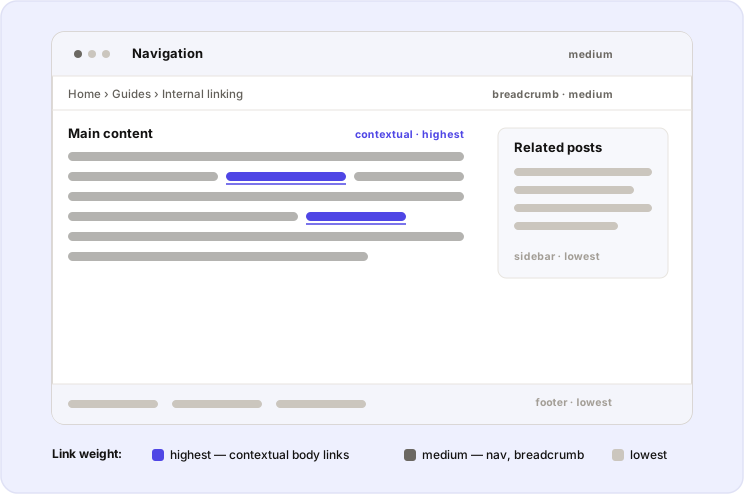
- Contextual links in the body of a page carry more weight than navigational, footer, or sidebar links.
- Internal links matter to search engines for four reasons — discovery, link equity, hierarchy, and anchor-text context — each of which Google has stated in its own documentation.
- Good internal linking is about structure, not volume: a shallow hierarchy, topic clusters, descriptive anchors, and intentional linking.
- Structure decays as a site grows, so internal linking is maintained with a periodic audit — which stops being possible by hand past a few hundred pages.
What is internal linking?
An internal link is a hyperlink from one page on your site to another page on the same site. Internal linking is the practice of placing those links deliberately, so that readers and search engines can move through your content along paths you have chosen.
In HTML, an internal link is an anchor element with an href pointing at another page on your domain:
<a href="/internal-link-audit/">how to run an internal link audit</a>The visible, clickable words — “how to run an internal link audit” — are the anchor text, and they do more work than they appear to. More on that below.
Internal links vs. external links
The distinction is simple and worth stating once, because the two are often discussed together.
| Internal link | External link | |
|---|---|---|
| Points to | Another page on your own site | A page on a different domain |
| You control it | Entirely | Rarely — you control outbound ones, not inbound |
| Primary role | Structure, navigation, and context within your site | Citing sources and earning references between sites |
Both matter. This guide is about the internal set, for one reason: it is the set you fully control. You decide which pages link to which, with what anchor text, from where on the page. Nothing about internal linking depends on anyone else’s decision.
The types of internal links
Not every internal link carries the same weight. These are the kinds you will place, roughly in order of how much they contribute.
Contextual links appear in the body of your content. They are editorial — you place them because they genuinely help the reader — and they sit where an engaged reader is most likely to click. These carry the most weight, and most of this guide is about them.
Navigational links are your header and menu links. They establish the site’s hierarchy and appear on every page, which makes them structurally important but template-level.
Breadcrumb links trace a page back up its hierarchy. Google has said it treats breadcrumbs as ordinary links, and they help both readers and crawlers understand where a page sits.
Footer links point to utility and legal pages — privacy policy, terms, contact. They are useful for people looking for them and carry little ranking weight.
Related and sidebar links surface adjacent content at the end of a post or alongside it. They help readers find more and they spread links across a site, but as template elements they are discounted relative to editorial body links.
The principle underneath this ordering: a link in the main content, high on the page, is worth more than the same link in a footer or sidebar. Place the links you care about where readers actually read.
Why internal linking matters for SEO
There are four reasons, and each is something Google has stated rather than something the SEO industry inferred. Where a claim is Google’s, it is linked to Google’s own source.
They help search engines discover your pages
Search engines find pages by following links from pages they already know. Google’s own guide to how Search works describes discovery this way: “Some pages are known because Google has already crawled them before. Other pages are discovered when Google follows a link from a known page to a new page.”
The consequence is direct. A page that nothing on your site links to — an orphan page — is much harder to discover. It may still be reached through your XML sitemap or an external link, but within your site, nothing leads to it. Finding and fixing these is a discipline of its own; see how to find and fix orphan pages.
They distribute link equity across your site
Links pass authority between pages. This is the idea behind PageRank, and Google has confirmed on the record that PageRank remains one of the many signals it uses. When a page with authority links to another page on your site, some of that authority flows along the link.
The practical use is that you can direct authority toward the pages that need it — newer posts, or important pages that have not earned many external links — by linking to them from your established ones. How this works, and where it stops being something you can measure, is covered in how link equity flows through a site.
They establish hierarchy and context
The pages you link to most, and the places you link from, tell search engines what you consider important. Google’s John Mueller has described internal linking as “one of the biggest things you can do on a website to guide Google and visitors to the pages that you think are important” — and added that what counts as important “is totally up to you.”
That is the strategic core of internal linking: it is how you express, in a form a crawler can read, which of your pages matter and how they relate. Getting that structure right is the subject of site structure and topic clusters.
Anchor text gives context
The anchor text of a link — its visible, clickable words — describes the destination to both readers and search engines. Google’s guidance on crawlable links is explicit that good link text helps it understand the linked page. An anchor that reads “email segmentation guide” tells a search engine what the target is about; one that reads “click here” tells it nothing. Descriptive anchors are covered in full in descriptive anchor text for internal links.
One boundary, stated plainly. Internal links make your work reachable, spread authority, and add context. Whether any specific change lifts any specific ranking is not something anyone can promise — the variables are too many and none of them are in one person’s hands. Everything in this section is worth doing regardless, because it is true of how the web is crawled and read, not because of a promised result.
How to build an internal linking structure
This is the practical core. None of it is difficult; it takes intention and consistency, which is the part that is genuinely hard to sustain by hand.
Plan a shallow hierarchy
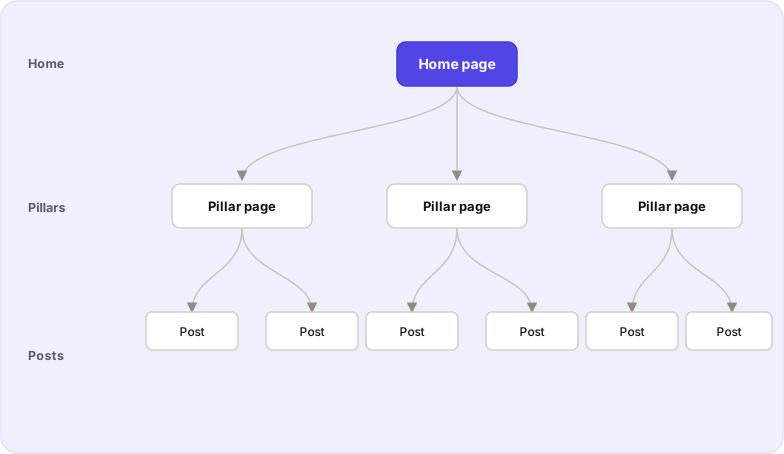
Keep your important pages within roughly three clicks of the home page. A shallow structure means readers reach your key content quickly and crawlers find it without traversing a deep chain of links. A page buried ten clicks down is discovered late and re-crawled rarely.
Organise with topic clusters and pillar pages
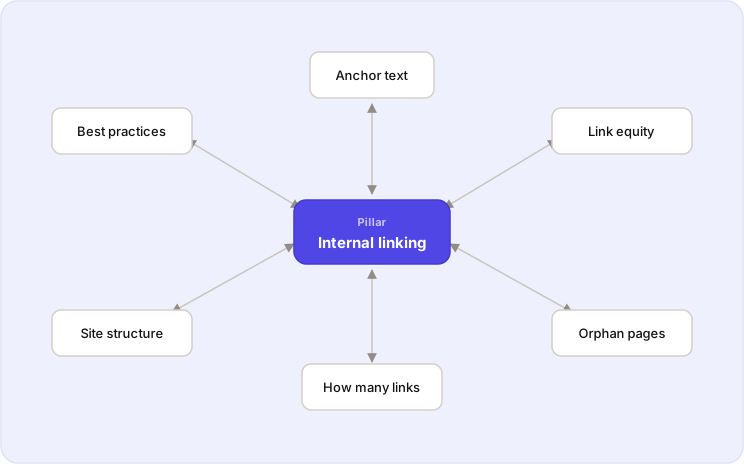
A topic cluster is a broad pillar page that covers a subject at a high level, surrounded by focused pages that each cover one part of it in depth. The pillar links down to each cluster page, and each cluster page links back up to the pillar. This is exactly the structure this guide sits at the centre of: it is the pillar for internal linking, and the articles it links to are its cluster.
The clusters signal to a search engine that you cover a topic comprehensively, and they give readers a coherent path through it. The full method — clusters, pillar pages, and how they relate to URL structure — is covered in site structure and topic clusters.
Link to the pages that matter most
Point your links at the content you most want found: your cornerstone articles, your key product or service pages, the posts you consider definitive. You can link to anything, but the pages you link to most are the ones you are telling search engines to treat as important — so choose deliberately.
Write descriptive anchor text
Name the destination in the link. “Our guide to keyword research” tells a reader and a search engine exactly what they will find; “click here” and “read more” waste the opportunity. Vary your anchors naturally rather than pointing at the same page with identical text every time. This is a quick habit that most sites skip, and it is one of the clearest signals you can send.
Place important links in the body, early
A link earns more attention, and passes more weight, when it sits in the main content where engaged readers actually click, rather than in a footer or a sidebar they skim past. Put the links you care about in the body of the page, and place them high rather than burying them at the end.
Link intentionally, not excessively
There is no magic number of internal links. A handful of genuinely relevant contextual links in a typical article is a sound default, and the right count depends on the length and depth of the piece. What is worth understanding is the trade-off: every link on a page divides the value passed through the others, so a page with a hundred links passes very little through each. The question to ask of any link is whether it genuinely helps someone understand the topic. If it does not, leave it out. This is covered in full in how many internal links a page should have.
Add links to older posts when you publish
New content does not connect itself. When you publish a post, the older, related articles that should point to it do not update themselves to do so — and that gap is exactly how orphan pages and underlinked pages form. The habit that prevents it is to add links to a new post from relevant existing content at the time you publish, and to revisit older posts as you write new ones.
This backward-linking problem is the reason automated internal linking tools exist at all: holding an entire site’s structure in your head, so that every new post links to and from the right older ones, is not realistic past a certain size.
Keep your links crawlable
For a link to pass value, a search engine has to be able to follow it. Use real <a href> links rather than JavaScript-driven controls, keep internal links dofollow by default, and reserve nofollow for pages you do not want indexed. A link a crawler cannot follow does none of the work described in this guide.
How to keep internal linking healthy: the audit
Internal link structure is not something you set once. It changes every time you publish, and it degrades in predictable ways. Keeping it healthy means checking, periodically, for three things:
- Broken internal links — links to pages that have moved or been deleted.
- Orphan pages — indexed pages that nothing links to.
- Underlinked pages and link opportunities — important pages with fewer inbound links than their importance calls for.
Doing this by hand means holding your whole site in your head at once: every page, every link, every anchor. It works for a small site and becomes impossible somewhere past a few hundred pages. The full method is in a complete internal link audit, which covers all three checks, and how to find and fix orphan pages for the one that catches people out most.
Internal linking on your own site with Core+ Links
The parts of this that do not scale by hand — holding the full set of pages and links, finding the orphans, ranking which existing pages a new post should link to — are the parts Core+ Links handles on your own server.
It indexes your published posts and pages, then ranks the most relevant internal targets for the post you are writing, each with a match score and the eight signals that produced it, directly in the block editor. From the same index it builds the orphan and underlinked reports — the audit checks above, made continuous rather than periodic. Every suggestion shows the eight ranking signals behind it, so nothing is a black box.
Core+ Links is deterministic: the same content and the same settings produce the same result every time. Indexing and ranking run entirely on your WordPress install. No content is sent anywhere, no API key is required, and there is no account to create.
Key points to take away
Internal linking is controllable, it compounds, and it is true of how the web works rather than of any one algorithm. It helps search engines discover your pages, distributes authority across your site, expresses which pages you consider important, and gives context through anchor text — all of which Google has stated in its own documentation. Getting it right is a matter of structure over volume: a shallow hierarchy, topic clusters, descriptive anchors, and links placed with intent. And because the structure decays as a site grows, it is maintained by auditing it — continuously, once a site is large enough that doing so by hand is no longer realistic.
It is worth doing well because it is within your control and because it reflects how your site is actually crawled and read. That is a sound reason on its own, and it does not depend on a promised ranking.
Try it on your own site — download Core+ Links Free.
Read the ranking model
The eight signals, renormalisation, and the overlinked penalty — in the docs.