WordPress · Internal linking
Internal linking that never leaves your site
Core+ Links is a free WordPress plugin that ranks internal link suggestions from your own content — each with a visible score — plus review-first auto-linking and internal Link Health, all running entirely on your server. Nothing is sent to a cloud, no account is required, and your content never leaves your site.
No credits. No cloud. No black box.
Coverage
Surface the internal links your older posts are missing
Core+ Links indexes your posts and pages and ranks the most relevant internal links for every post as it is written, so older articles keep getting linked instead of being forgotten — with nothing sent off your server.
How it works
Index the site. Suggest while writing. Insert once.
-
01
Index your content
Every published post and page — titles, headings, taxonomies, excerpts, and body text — is written into an index in your own database.
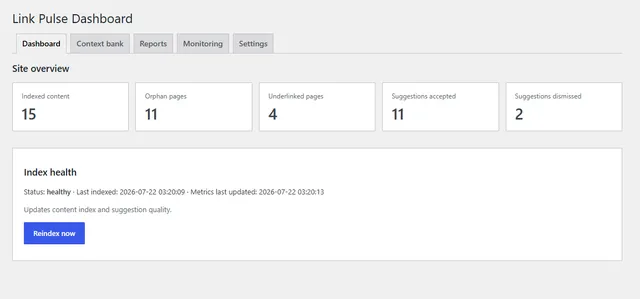
Index freshness and job status on the admin dashboard. -
02
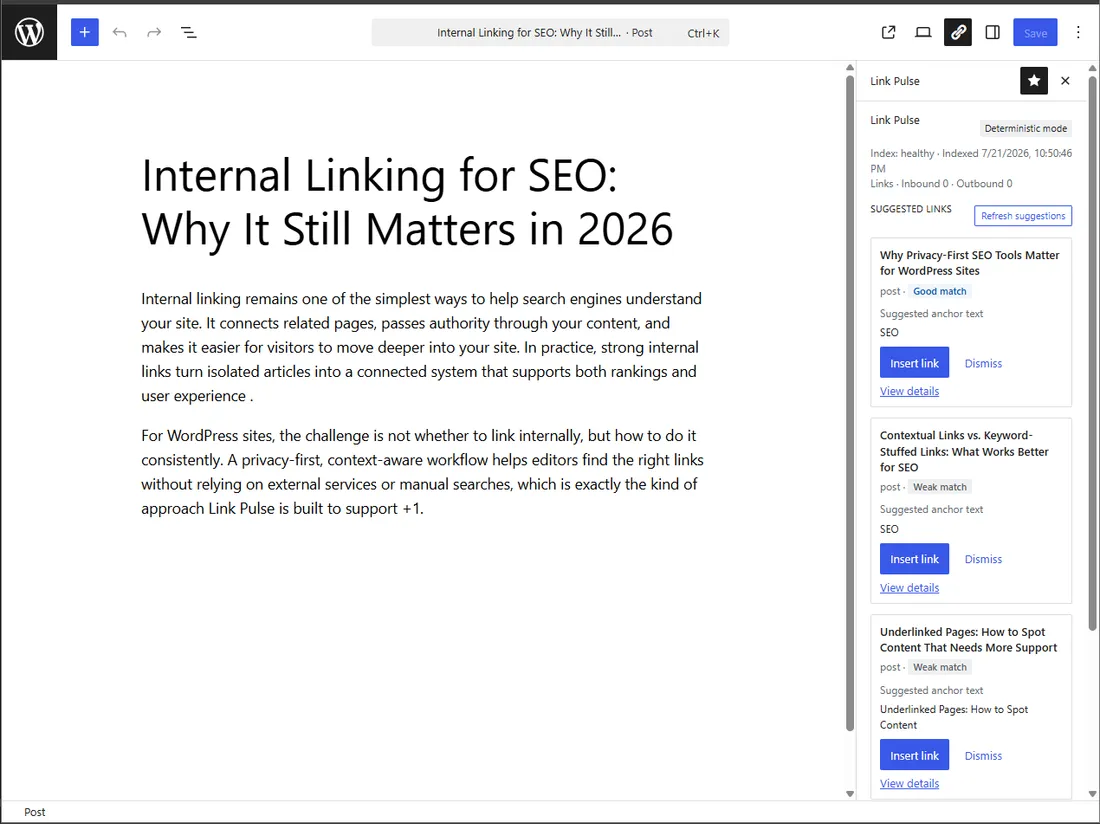
Suggest links in the editor
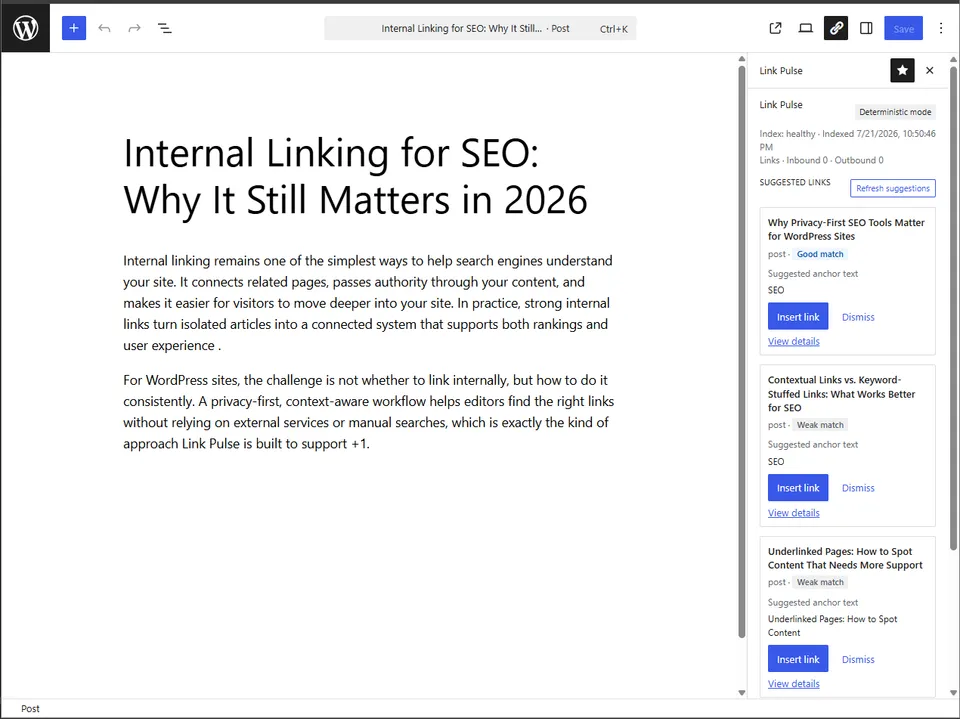
Open a post in the block editor, and the sidebar ranks the most relevant targets from your own content, each with a visible score — plus inbound and outbound link listings for the page you are editing.
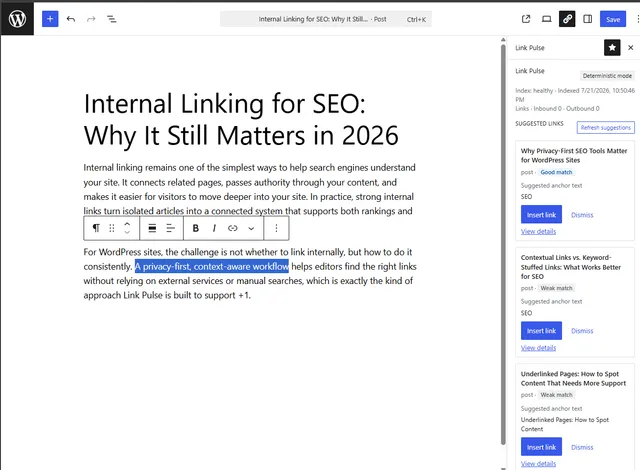
Suggestions appear beside the post while writing. -
03
Insert in one click
Edit the suggested anchor if you want, then insert. Dismissed suggestions stay dismissed.
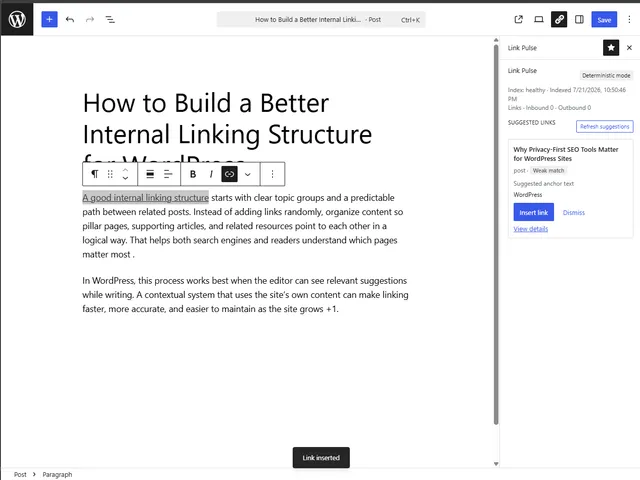
One-click insert places the link and confirms it.
Auto-linking
Link the whole site — after you review every match
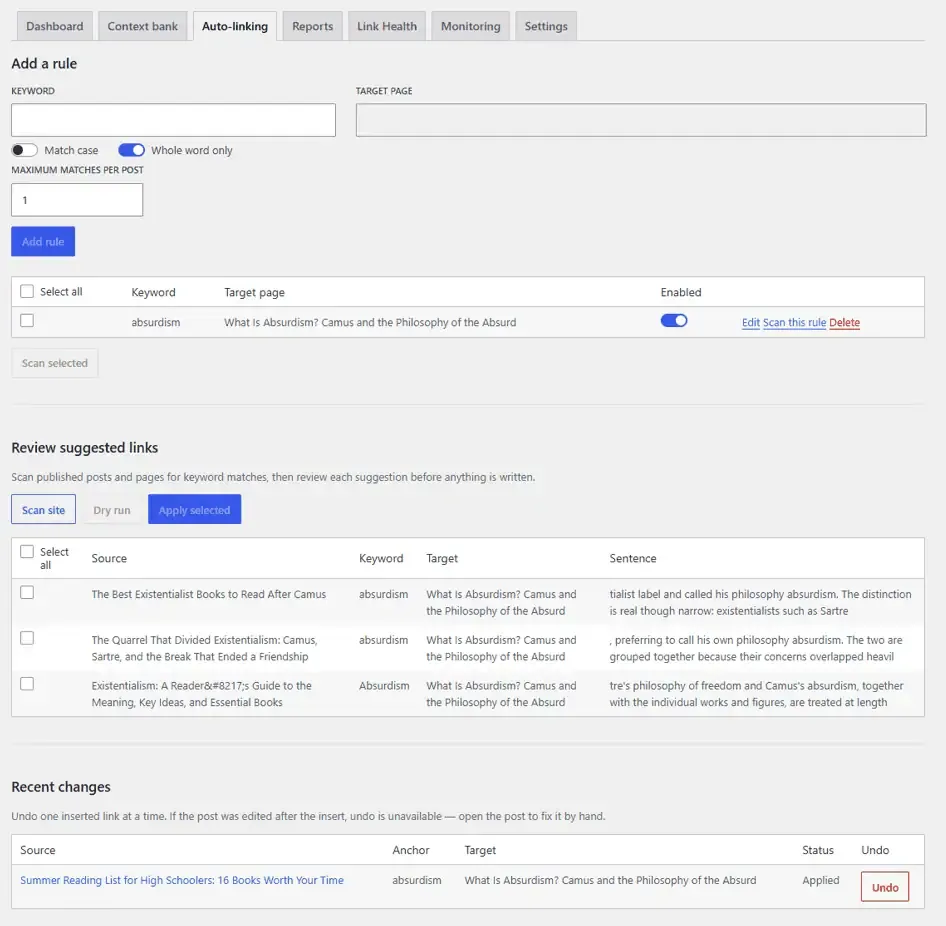
Define a keyword and the published post or page it should point to. Core+ Links scans your posts and pages for matches and lists each one for review — the source, the keyword, the target, and the sentence the link would land in. Nothing is written until you confirm.
Apply the rows you select, one at a time or as a batch. Every insert creates a WordPress revision. Change history lists every link the plugin inserted — filterable and sortable — with one-click undo for a single change, a whole run, or every link from one keyword rule. A post edited since the link was added is flagged for you to fix by hand, never silently overwritten. Each rule shows how many pages it has linked.
Two path lists — Only auto-link these pages and Never auto-link these pages — bound which pages bulk apply may edit. Auto-linking never runs on a schedule and never applies on its own. Unattended, scheduled apply is a separate Pro capability — not something Free does quietly in the background.
Why deterministic
See the score behind every suggestion
Not a model and not an inference — a calculation. Identical content and settings produce identical results every time.
| Signal | Weight |
|---|
The weights sum to 1.00.
The weights sum to 1.00. Taxonomy leads because two posts that share a category provide stronger evidence of related subject matter than two posts that share a word.
No model is involved, so no content is transmitted, no API key is required, and no request incurs a cost. The free plugin is deterministic and entirely local by design — that is the product, not a limitation.
Privacy
Nothing leaves your WordPress install
Core Plus Links indexes, ranks, auto-links, and runs Link Health on your own server, against your own database. It sends your content to no external service. It requires no API key and no account, and carries no telemetry of any kind.
Core+ Links Pro adds optional AI-assisted matching through your own provider key. It is enabled deliberately, and once enabled, content is sent to the chosen provider. The trade-off is explicit, and the decision remains yours.
Reports
Find the gaps in your internal linking
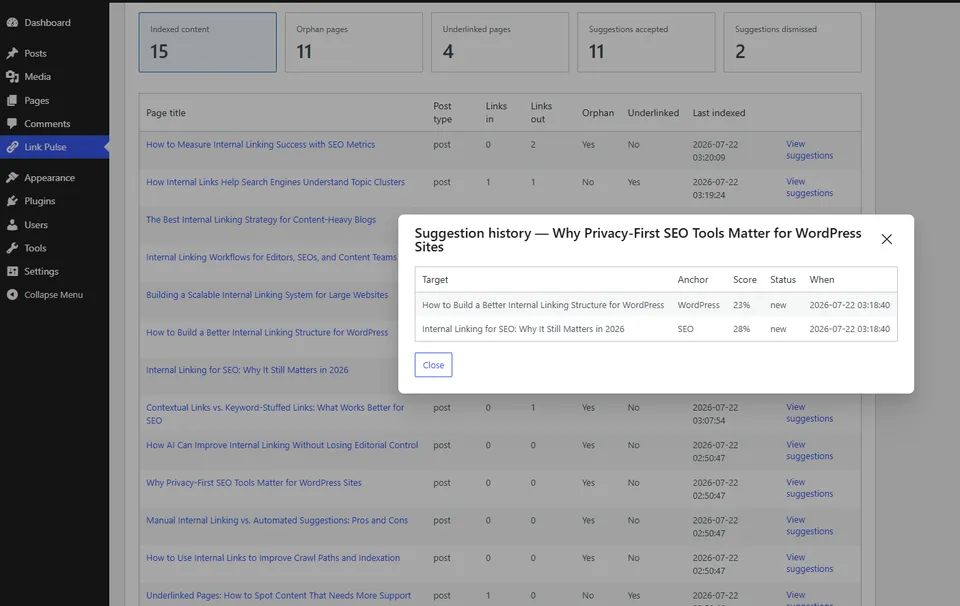
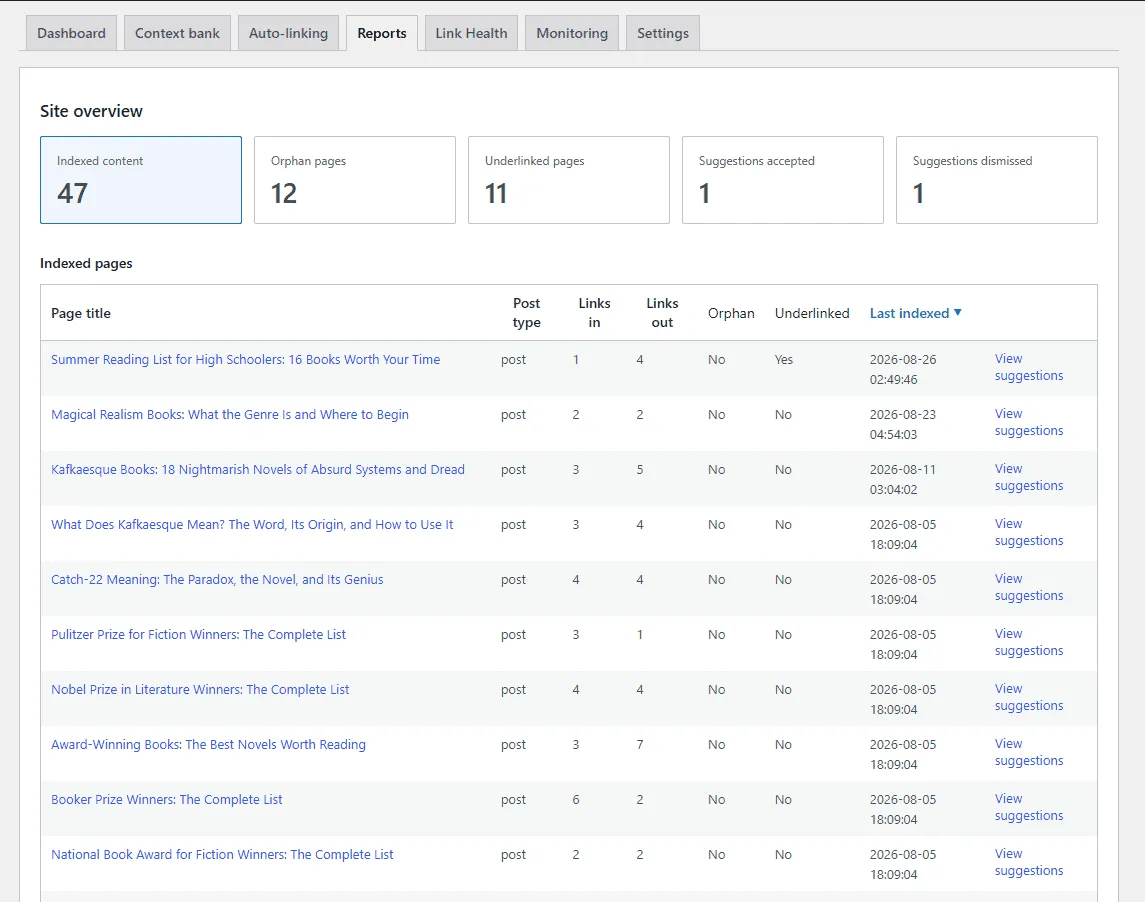
Orphan pages are indexed pages with no internal links pointing to them. Underlinked pages have fewer inbound links than their importance calls for. Excluded pages appear in neither report — otherwise utility pages such as a privacy policy would dominate the orphan list permanently.
Suggested exclusions for utility pages are proposed for your review and never applied automatically.
The reports identify structural gaps. They do not predict the effect of closing those gaps on rankings, because that outcome cannot be verified.
Link Health
Catch internal links pointing at pages that are gone
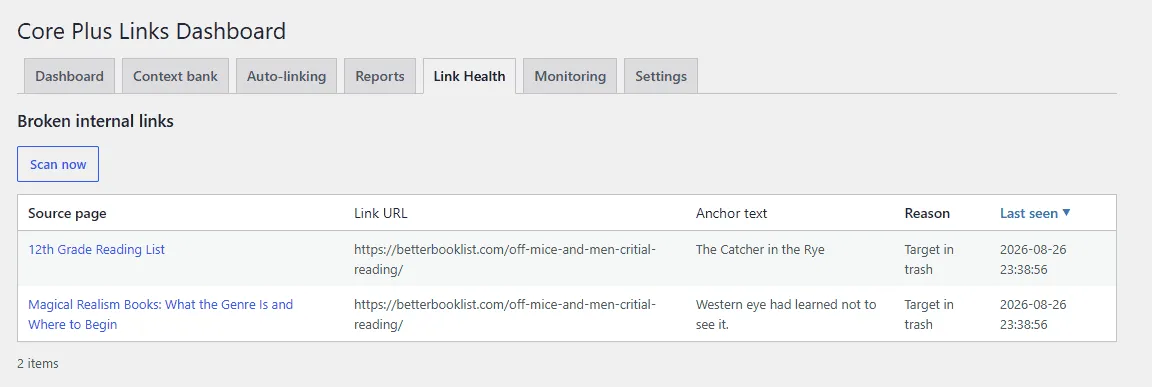
Link Health reports internal links whose targets are no longer published — pages that are unpublished, in the trash, or deleted outright. Each row shows the source page, the link URL, the anchor text, the reason, and when it was last seen.
It is a separate screen from the orphan and underlinked reports above. Run a scan from the admin when you want one; on quiet sites the job finishes in the same request instead of waiting on WP-Cron.
Link Health checks internal targets only. It does not crawl the public web or HTTP-check external URLs, and it does not flag unresolved /go/-style affiliate links as broken. External checking is a Pro capability.
What is in Free
The full free product
Suggestions, auto-linking you review, Link Health, reports, and indexing on your own install — complete for posts and pages, not a trial, and not a preview of Pro.
- Posts and pages indexed
- Deterministic suggestions in the block editor
- Inbound and outbound link listings
- Editable anchor text before insert
- One-click insert and persistent dismissals
- Context bank for taxonomies and exclusions
- Suggested exclusions for utility pages — you decide
- Orphan and underlinked reports, sortable and paginated
- Auto-linking: keyword rules, scan, review, and apply selected
- Change history: undo per change, per run, or per rule
- Per-rule footprint: how many pages each keyword has linked
- Auto-link scope: only-apply-to and never-apply-to path lists
- Link Health: unpublished, trashed, or missing internal targets
- Background and scheduled reindexing
Free indexes posts and pages. Custom post types, custom fields, AI-assisted matching, external HTTP checking, and scheduled auto-link apply are in Core+ Links Pro (Upcoming) — separate product, not locked features inside Free.
Everything in more detail , or the full Free and Pro comparison .
Pro
Pro adds capability. Free stays whole.
Core+ Links Pro adds custom post type indexing, custom field support, AI-assisted matching with your own provider key, external HTTP broken-link checking, scheduled Link Health scans, and scheduled auto-link apply.
Pro is a separate product — Upcoming. Free does not contain locked Pro code. What ships in Free remains in Free.
FAQ
Questions before installing
Does it send my content anywhere?
Do I need an API key or an account?
Does auto-linking change my posts by itself?
Can I undo an auto-linked insert?
What broken links does Link Health find?
Does it work with the classic editor?
Does it work on multisite?
Is it on WordPress.org?
Will it slow down my site?
What happens to my data if I uninstall?
Is Free going to stay free?
Free · No account required · Works without an API key
Install it on your own site
Install Core Plus Links from WordPress.org, with no account and no API key. If it does not suit the site, deactivating it leaves nothing behind except the settings you chose to keep.