Last updated
Link Health
Link Health reports internal links whose targets are unpublished, in trash, or missing. It is a separate admin screen from Reports (orphans, underlinked pages, and suggestion history).
Open Link Health from the Core Plus Links admin.
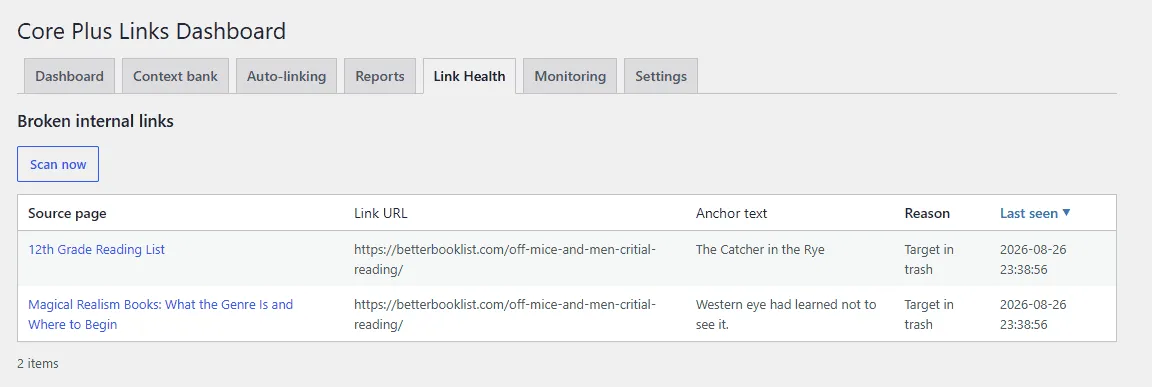
Run a scan
Scan now starts a background job. On quiet sites the job also drains in the admin request, so you do not have to wait on WP-Cron traffic. When a scan has never completed, the screen asks you to scan rather than showing an empty “clean” report.
What is checked
Published posts and pages are scanned for internal links whose targets are:
- Target not published
- Target in trash
- Target no longer exists
The report lists the source page, the stored link URL, the anchor text, the reason, and when it was last seen.
Link Health is a report. It does not rewrite or repoint the link for you. Open the source post and edit the link in the editor.
What is not checked
- External URLs. Core Plus Links does not crawl the public internet and does not HTTP-check destinations off your site.
- Unresolved short links such as
/go/affiliate URLs. Those are not listed as broken. - Scheduled or unattended scans. Manual scan only. Scheduled scanning is Upcoming in Core+ Links Pro.
External HTTP checking is Upcoming in Pro. Do not treat Free Link Health as a full-site crawler.
Related: Reports, Auto-linking, Troubleshooting.