5 min read
How many internal links per page?
It is one of the most common questions in internal linking, and it has an unsatisfying but honest answer: there is no fixed number. What there is instead is a set of factors that decide the right count for a given page, and a trade-off worth understanding. Once you have those, the question mostly answers itself.
This article covers whether a magic number exists, what actually determines the count, the dilution principle underneath it, and a default you can work from. It is one part of the complete guide to internal linking for SEO.
Is there a magic number?
No. There was once a widely repeated guideline of keeping to around 100 links per page, but that came from an old technical limit that no longer applies, and Google long ago removed the specific figure from its guidance. The current position is to keep the number of links on a page to a reasonable amount — a judgement, not a fixed cap.
So the useful question is not “what is the limit” but “what is the right number for this page”. That depends on a few things.
What determines the right count
The length and depth of the content. A three-thousand-word guide naturally supports more internal links than a short post, because it covers more ground and more genuine linking opportunities arise. Count follows content, not the other way around.
Relevance. The right links are the ones that genuinely help a reader understand the topic or reach related content. A relevant link earns its place; an unrelated one does not, however much room the page has. Describing each with clear anchor text is part of making it earn its place.
The trade-off between links. This is the part worth understanding properly, because it is the reason more is not always better.
The dilution principle
Every link on a page shares in the authority that page can pass. The link equity a page has to give is divided among its outbound links, so a page with a hundred links passes roughly a hundredth through each, while a page with five passes far more through every one.
This does not mean you should hoard links. It means each link has a cost, and that cost is worth paying only when the link helps. Adding a genuinely useful link is a good trade; padding a page with marginal links spreads its value thin and gives a reader more noise to wade through.
There is a readability cost too. A page peppered with links is harder to read, and a search engine may reasonably read heavy over-linking as optimisation ahead of usefulness.
Navigation links count differently
One clarification that resolves a lot of confusion: the “how many” question is really about contextual links in the body of your content. The links in your header, footer, and sidebar are part of your site’s template and appear on nearly every page. They matter for site structure, but they are not what you are counting when you ask how many links a given article should have.
So when the guidance below says “a handful of links”, it means a handful of editorial links within the content — over and above the navigation that is already there on every page.
A sensible default
For a typical article, a handful of relevant contextual links — on the order of three to five — is a sound starting point, alongside your normal navigation. Scale it with the length and depth of the piece: a long, comprehensive guide will carry more, and a short post fewer.
The test for any single link is simple: does it genuinely help someone understand or continue with the topic? If yes, include it. If not, leave it out. Counting to a target is the wrong instinct; judging each link on its merits is the right one.
To make that concrete: a 1,200-word how-to might carry three or four links — one up to its pillar, one or two to closely related posts, and perhaps one to a definition of a term it uses. A 4,000-word guide covering many sub-topics might carry a dozen, because a dozen genuinely relevant destinations exist within it. Neither number was chosen in advance; both fell out of asking, at each link, whether it earned its place. The long guide does not have more links because it is long — it has more because it has more to connect.
Too few, and too many
Both directions have a failure mode.
Too few and you miss real connections. Pages end up underlinked, or worse, orphaned — reachable by nothing on the site. Finding those is covered in how to find and fix orphan pages.
Too many and you dilute the value passing through each link, and you make the page harder to read. Long lists of barely-relevant links help no one.
The healthy middle is not a number. It is a habit of linking where it helps and stopping when it does not — which is easier to hold as a principle than to apply consistently across a whole site by hand. Checking that the habit is actually holding, across every page, is the work of a full internal link audit.
How Core+ Links helps with the count
The problem with “link where it helps” is knowing where that is, across a site of any size. Core+ Links addresses the count from the other end: rather than prompting you to add more links, it ranks the most relevant candidates for the post you are writing, each with a match score and the signals behind it, so you add the few that genuinely fit rather than as many as possible.
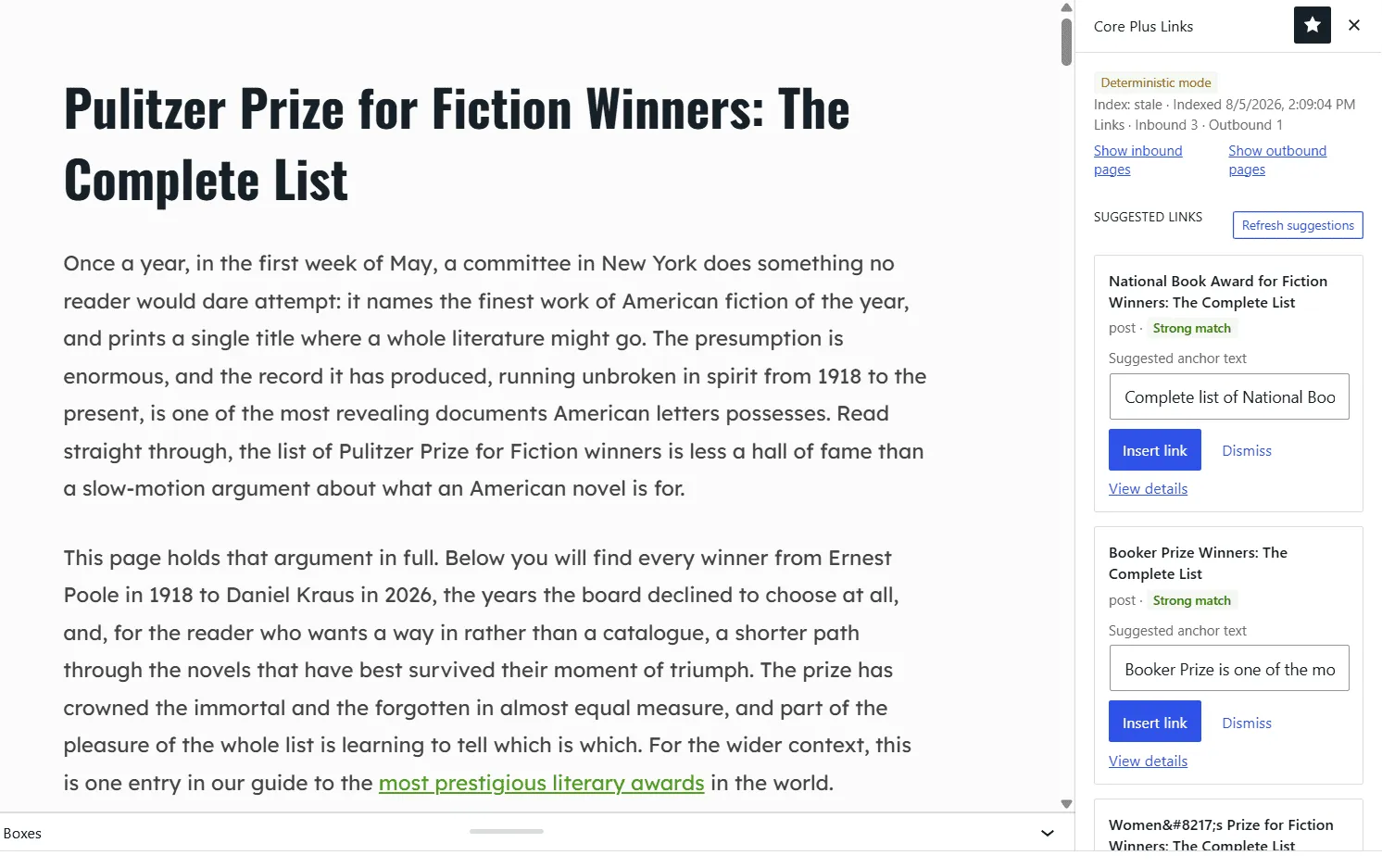
A short ranked list surfaces the few links that fit — not a prompt to add more.
It also applies a penalty to pages that are already heavily linked, which pushes suggestions toward pages that need a link rather than pages that already have plenty. The effect is fewer, better-placed links. It runs on your own WordPress install, deterministically, and sends nothing off-site.
Try it on your own site — download Core+ Links Free.
Read the ranking model
The eight signals, renormalisation, and the overlinked penalty — in the docs.