Last updated
Auto-linking
Auto-linking maps a keyword you define to a published post or page. Core Plus Links finds matches, you review them, and you apply the ones you confirm. Nothing is written until you confirm.
Open Auto-linking from the Core Plus Links admin.
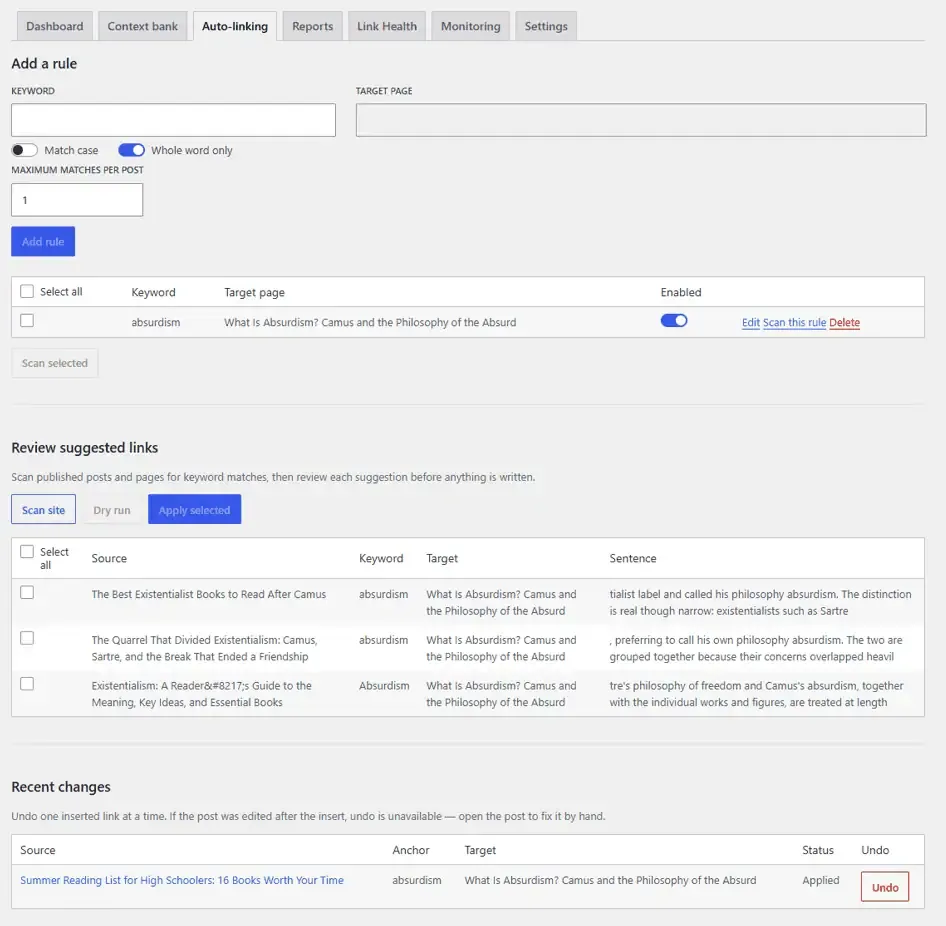
Add a keyword rule
- Enter the Keyword.
- Choose a Target page — a published post or page.
- Optionally set Match case, Whole word only, and Maximum matches per post.
- Add rule.
There is no cap on the number of rules. A duplicate keyword and target is rejected.
Enabled rules suggest links in scans and the editor. Turning a rule off does not remove links it already inserted — undo those in Change history.
Each rule shows how many pages it has linked (N linked pages). A non-zero count opens Change history filtered to that rule. Undo all links from this rule reverses every safely reversible insert from that rule; it does not disable or delete the rule.
Scan and review
Scan site searches published posts and pages for matches. Suggested links appear under Review suggested links. Each row shows the source, keyword, target, and sentence.
Nothing is inserted at this stage. Review the list, select the rows you want, and choose Apply selected — one row or a selected batch. You can run a Dry run first; that reports what would apply without writing content.
Apply writes the link into the source post and creates a WordPress revision.
Which pages bulk apply may edit is bounded by Auto-link scope.
Recent changes
Recent changes on this tab lists recent Auto-linking inserts. Undo on a row removes that inserted link only. The visible text stays in the post. Undo also creates a WordPress revision.
The full audit trail — filters, Undo this run, and when a row was undone — lives in Change history. If a post was edited after the insert, that row is flagged for you to fix by hand. The plugin never silently overwrites later edits.
What Auto-linking does not do
- It does not insert links on a schedule or without confirmation. Scheduled or automatic apply is Upcoming in Core+ Links Pro.
- It does not run in the classic editor.
Related: Change history, Auto-link scope, Installation, Editor sidebar, Changelog.