6 min read
How to find and fix orphan pages
Some of your best pages may be invisible to the rest of your own site. Not deleted, not hidden from search — published, indexable, and linked from nothing. These are orphan pages, and most sites of any age have more of them than their owners expect.
A page nothing links to is harder for a reader to reach and slower for a search engine to discover and re-crawl. It also receives no link equity, because there is no internal link to carry any. That is the whole of the problem, and it is enough of one to be worth solving.
This article covers what an orphan page is, why orphans accumulate, how to find them, and how to decide which are worth fixing. For the wider context, see the complete guide to internal linking for SEO.
What an orphan page is
An orphan page is an indexed page with no internal links pointing to it from anywhere else on your site. Within the site, nothing leads to it.
Three things it is often confused with, and is not:
An orphan is not a noindexed page. A noindexed page is one you have deliberately kept out of search. An orphan is usually a page you want found and forgot to link. The two problems are opposites — one is intentional exclusion, the other is accidental neglect.
An orphan is not necessarily low quality. Often it is the reverse. Substantial older posts orphan easily, because the newer writing that should point back to them was written without them in mind.
Reachable from the sitemap is not the same as linked internally. An XML sitemap helps a search engine discover a page, but it gives the page none of the context that an internal link carries — the surrounding topic, the descriptive anchor, the relationship to the rest of your work. A page can sit in the sitemap and still be orphaned.
Why orphan pages happen
Orphans are rarely created on purpose. They accumulate through ordinary site activity, and most sites collect them the same handful of ways.
Publishing order. A post goes up before the related posts that would naturally link to it exist. Nothing links to it at the time, and nothing goes back to add the link once the related posts arrive.
Removed navigation or widgets. A page linked only from a menu, a sidebar, or a “related posts” block is orphaned the moment that block changes. The link was never in the body of any page, so nothing in the content preserved it.
Site migrations and redesigns. URLs move, and not every link is updated to match. Pages that were well connected on the old structure fall out of the new one.
Deleted or restructured archives. Category and tag archives quietly do a lot of internal linking. Prune or reorganise them and the posts they held can lose their only inbound links.
Imported or bulk-created content. Pages added outside the normal editorial flow — imports, migrations, programmatic pages — rarely get linked into the site the way a hand-written post does.
How to find orphan pages
Start with the one fact that makes orphans harder to find than they sound: a crawler cannot find them on its own.
A crawler discovers pages by following links. An orphan has no inbound links, so a crawl never reaches it — the page is invisible to the exact tool most people reach for first. Finding orphans always means comparing every page that exists against every page the crawl reached. The difference between those two sets is your orphan list.
There are four practical ways to get there.
Crawl, then cross-reference against a full URL list. Export every published URL from your CMS or your XML sitemap, crawl the site to see which pages the internal links actually reach, and subtract the crawled set from the full set. What remains is orphaned.
Google Search Console. Pages that are indexed but draw almost no impressions, or that sit under “Discovered — currently not indexed”, are worth checking for inbound internal links. Search Console will not label them as orphans, but it points you at the candidates.
Your CMS’s own data. Some platforms can report how many internal links point to each page. Anything sitting at zero is, by definition, an orphan.
A tool that indexes all your content and reports orphans directly. This removes the manual cross-reference: hold the full set of pages and the full set of links in one index, and the orphans fall out without a crawl-and-subtract.
One step comes before you read any orphan list: exclude your utility pages first. A privacy policy, terms page, cookie notice, and thank-you page are all legitimately orphaned, and none of that is worth fixing. Left in the list, they bury the orphans that matter under pages that are working exactly as intended.
How to fix orphan pages
Fixing orphans is not automatic, and it should not be. Each page is a decision, and there are three possible answers.
Link it. If the page should be found, add internal links to it from relevant existing posts — the older, related articles a reader on this topic would expect to lead here. This is the right answer for most orphaned content.
Redirect or merge it. If the page duplicates or has been superseded by another, redirect it and fold anything worth keeping into the page that replaces it. An orphan that should not exist is not a linking problem.
Leave it. If it is a utility page or one you intentionally keep unlinked, an orphan is the correct state. Not every orphan is a mistake.
When the answer is link it, link it well. Add the links from genuinely relevant posts rather than the nearest handful. Use descriptive anchor text that names the destination, so a reader knows where the link goes before clicking. Prefer links in the body of your content over another sidebar block — a body link survives the next redesign, and a widget link is how the page was orphaned in the first place.
Then re-check. A page stops being an orphan the moment one relevant internal link points to it; confirm it has left the list on your next pass.
One honest note to close on. Finding an orphan and linking it makes the page reachable and gives it context within your site. Whether that changes a ranking is not something anyone can promise, and it is not the reason to do it. The reason is that a page worth publishing is worth being able to find.
Finding orphans continuously with Core+ Links
The manual cross-reference in the first method — export everything, crawl, subtract — is the part that does not scale as a site grows. It is the part Core+ Links indexes your site to remove.
It indexes your published posts and pages and produces the orphan pages report directly. There is no crawl-and-subtract, because the index already holds the full set of pages and the full set of links at once. You can exclude utility pages from indexing up front, and because exclusion is total and bidirectional, those pages never appear in the report to be waved off.
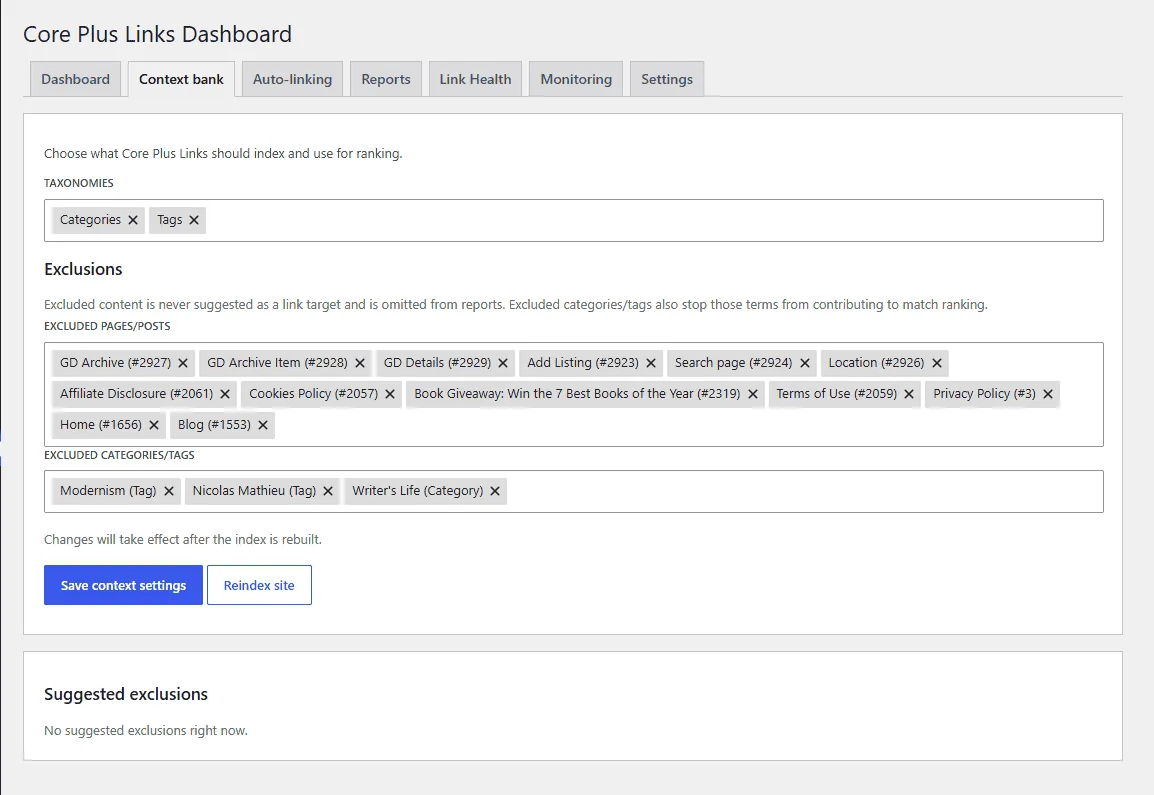
Excluded pages are never suggested as a target and never appear in the orphan report.
The index runs entirely on your own WordPress install. It is deterministic — the same content and settings produce the same report every time — and it sends nothing off your server.
For orphans as one part of a wider review, this pairs with a full internal link audit, which also covers underlinked pages, anchor quality, and link depth.
Try it on your own site — download Core Plus Links Free.
Read the ranking model
The eight signals, renormalisation, and the overlinked penalty — in the docs.