Features
The internal linking engine that shows every score
Core+ Links indexes published content, ranks internal link targets against eight weighted signals — each open to inspection — auto-links keywords you approve, and reports orphan pages, underlinked pages, and broken internal links, entirely on the WordPress installation already in use.
Internal linking that never leaves your site. The sections below are the mechanism behind that claim.
Indexing
What the index stores, and what it ignores
Published posts and pages are indexed. Free indexes post and
page only. Custom post types and custom field indexing are
Upcoming in Core+ Links Pro.
Per item, the index stores title, excerpt, headings, cleaned body text, taxonomy terms, slug, published date, parent/child relationship, and inbound and outbound internal link counts.
Excluded by default: drafts, private content, password-protected content, trash, auto-drafts, revisions, menus, and attachments. Everything is stored in your own database tables. Nothing is transmitted.
Scoring
Eight signals produce one match score
Every suggestion is a calculation open to inspection — not a model, not an inference.
| Signal | What it measures | Weight |
|---|
The weights sum to 1.00.
Reproducible
Same content, same settings, same results. Scores do not drift between runs, so a suggestion dismissed yesterday does not reappear ranked differently today for no reason.
Explainable
Each suggestion shows its match strength and the signals that contributed. Nothing is asserted without its basis.
Local
No model, no inference, no external call. There is nothing to accept on trust and nothing metered per request.
Why taxonomy leads
Shared words are weak evidence of relevance. A post titled “The Best Books of 2025” and a post titled “Best Camera Bags” share the word “best” and nothing else of substance. Shared taxonomy is much stronger evidence that two pieces of content concern related subject matter. Weighting taxonomy above title overlap prevents shallow word collisions from outranking genuine topical relationships.
The full scoring model, including normalisation and the overlinked penalty.
Editor
Suggestions surface in the block editor
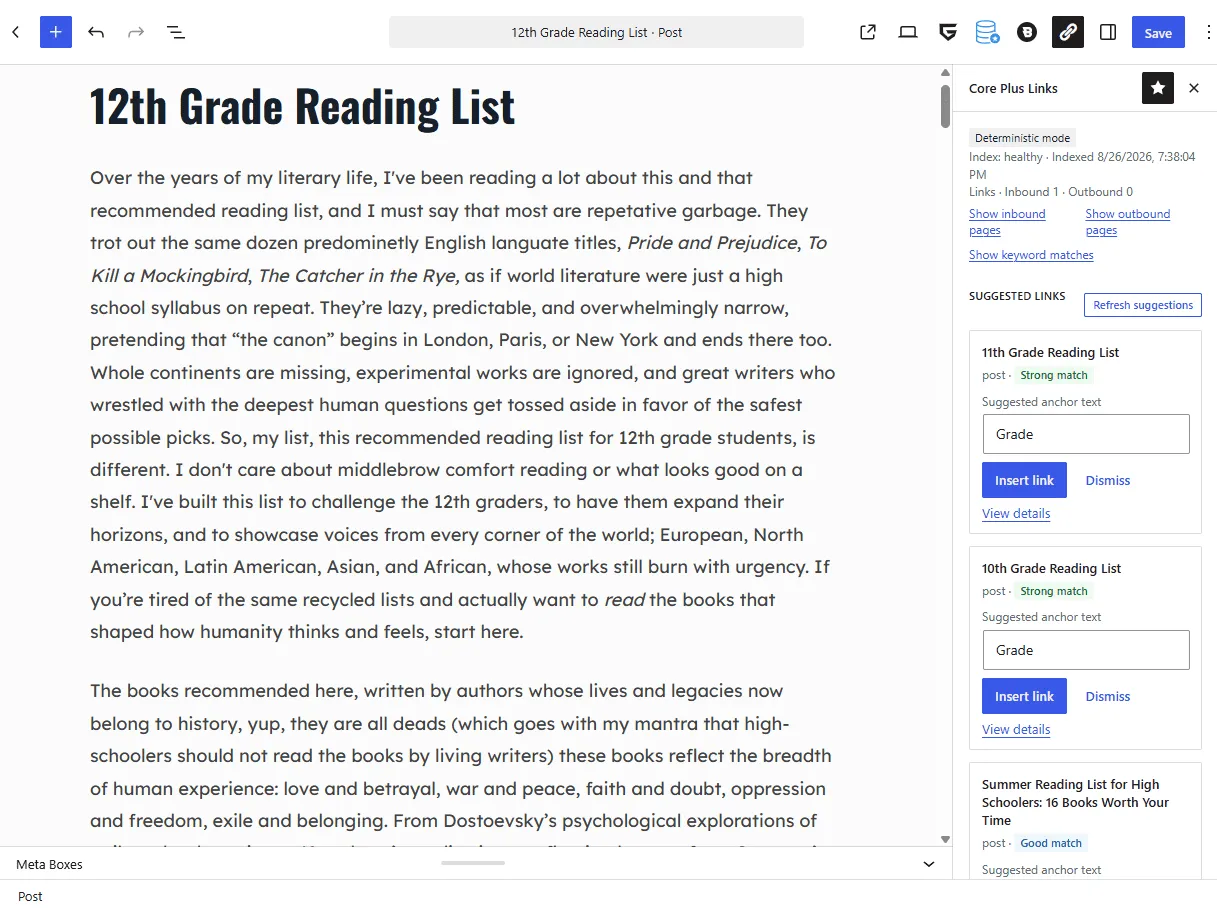
Suggestions appear in a Gutenberg PluginSidebar during writing. It displays index health, inbound and outbound counts for the current post, ranked targets with match strength, suggested anchor text (editable before insert), one-click insert, and dismissals that persist.
Free displays no Pro prompt in the sidebar. The writing surface remains a writing surface.
Context bank
Exclude pages that should never be link targets
The context bank controls what is eligible as a link target. Exclusions are total: an excluded page is neither suggested nor counted toward orphan and underlinked reports. Without this control, legal and utility pages would remain permanently on both lists. Suggested exclusions for utility pages are proposals you review — nothing is auto-excluded.
Reports
Find orphan and underlinked pages
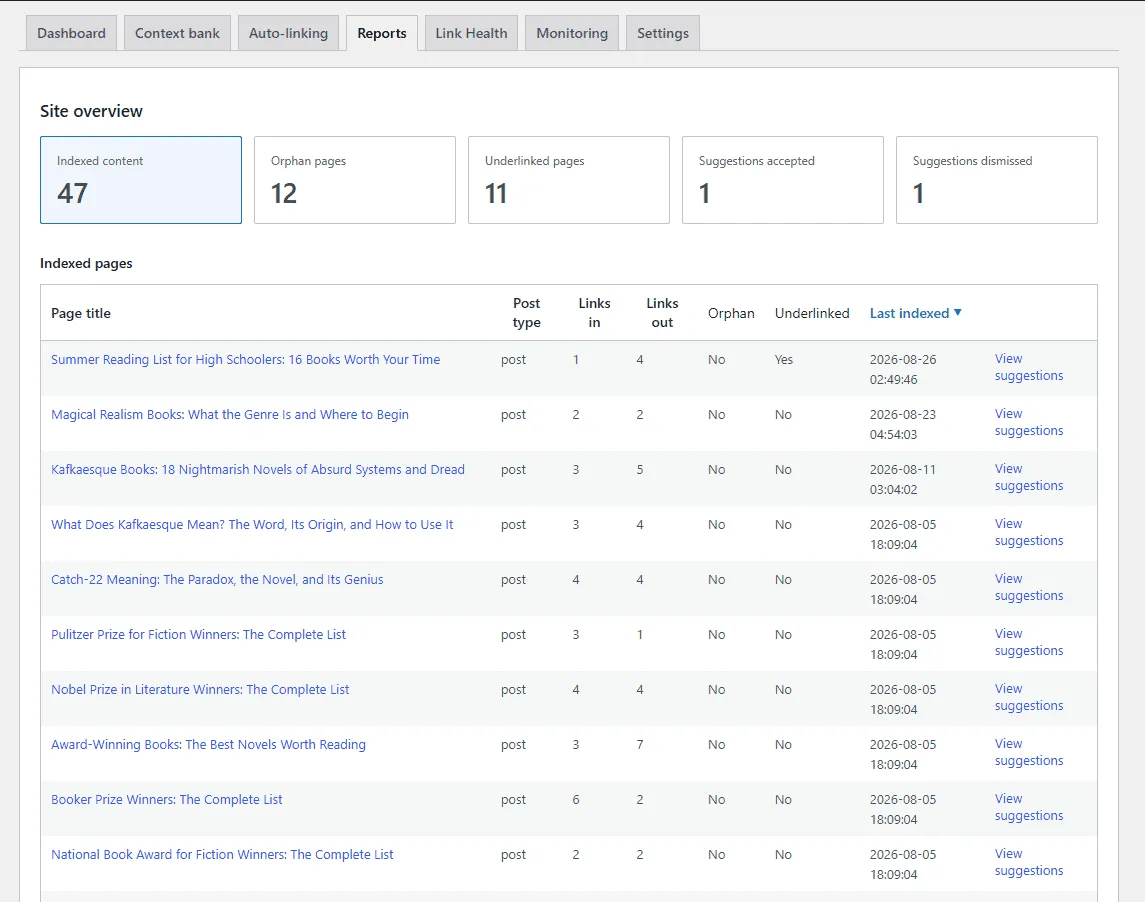
Orphan pages have no internal links pointing to them. Underlinked pages have fewer inbound links than their importance calls for. Both reports are produced from the same local index.
The reports identify where the structural gaps are. They do not state what closing them will do to search rankings; no tool can make that determination with honesty.
Auto-linking
Keyword rules you review before anything is written
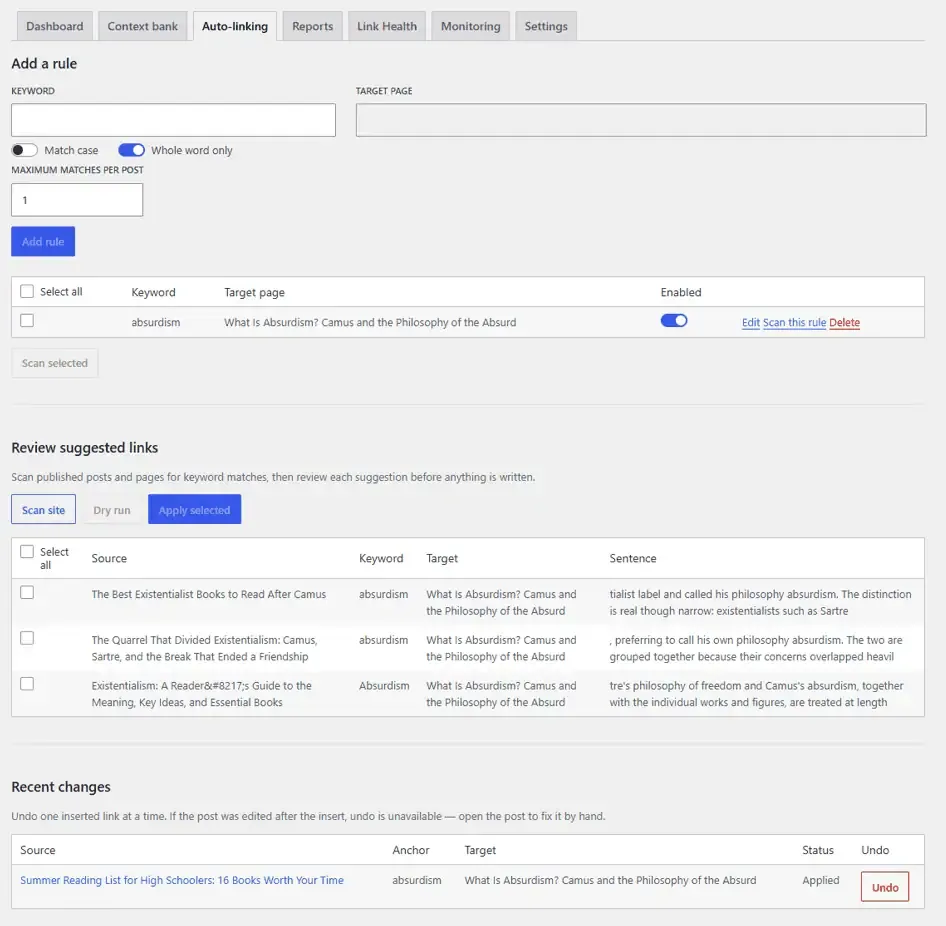
Define a keyword and the page it should point to. Scan published posts and pages, review the matches, and apply the ones you want — one at a time or as a selected batch. Core Plus Links creates a WordPress revision when it writes. Nothing is applied until you confirm.
Each keyword rule shows how many pages it has linked, with a click-through to those pages in Change history. Turning a rule off does not remove links it already inserted — undo those from Change history. Scheduled or unattended apply is not part of Free — that is Upcoming in Pro.
Change history
Every inserted link, with one-click undo
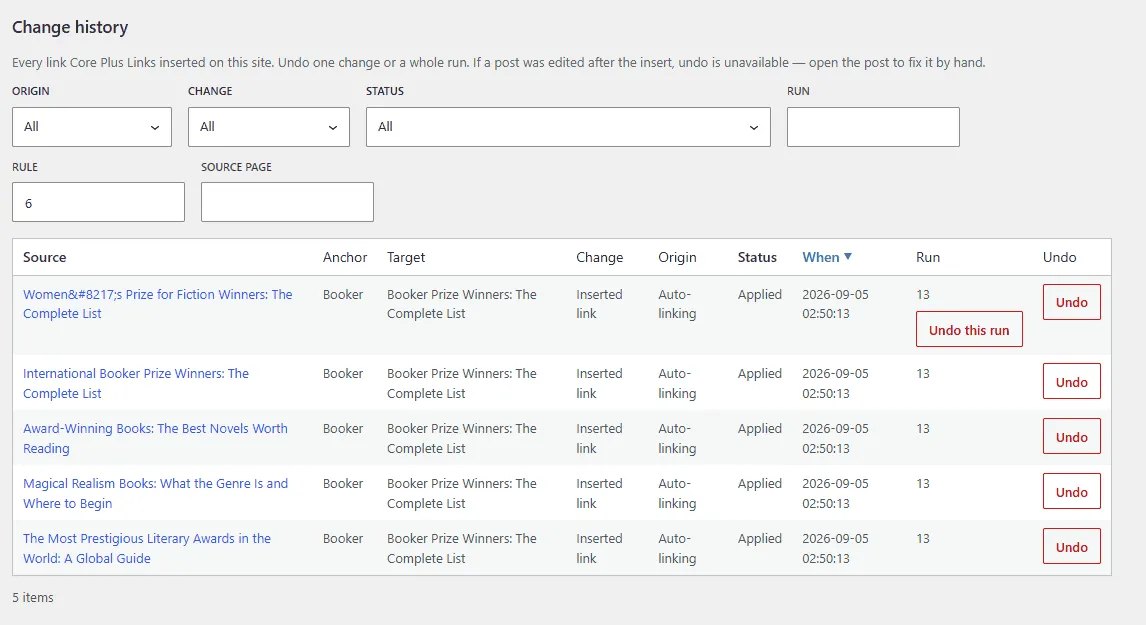
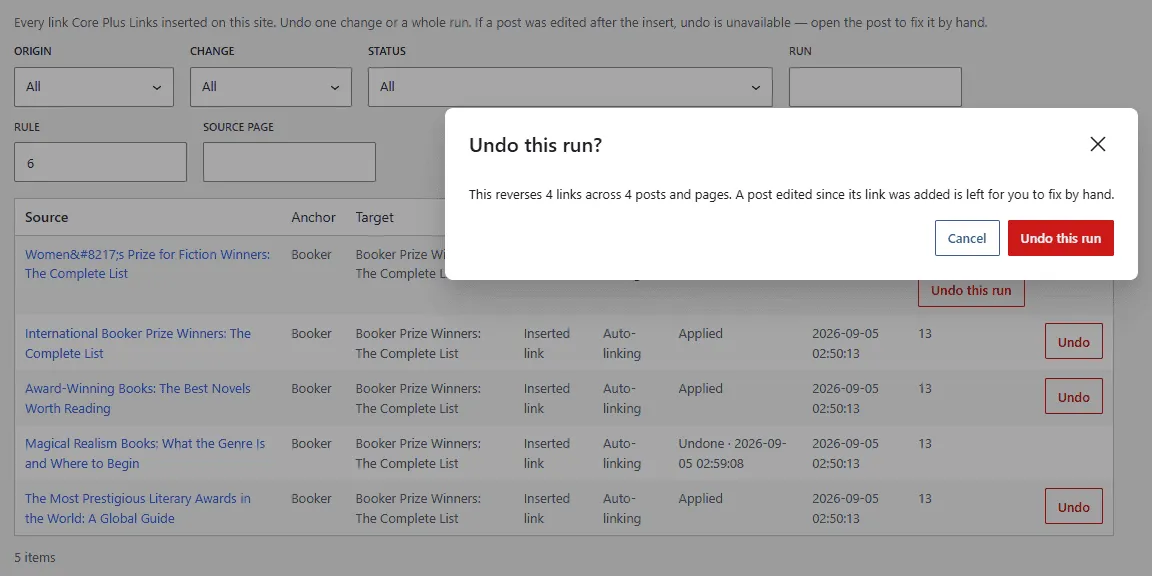
Change history lists every link Core Plus Links has inserted — filterable by origin, type, status, run, rule, and source page, and sortable. Undo a single change, a whole run, or every link from one keyword rule. The confirm shows how many links across how many pages you are about to reverse. Undone entries show when they were undone.
A post edited since the link was added is flagged for you to fix by hand. The plugin never silently overwrites later edits.
How Change history and undo work.
Auto-link scope
Control which pages bulk apply may edit
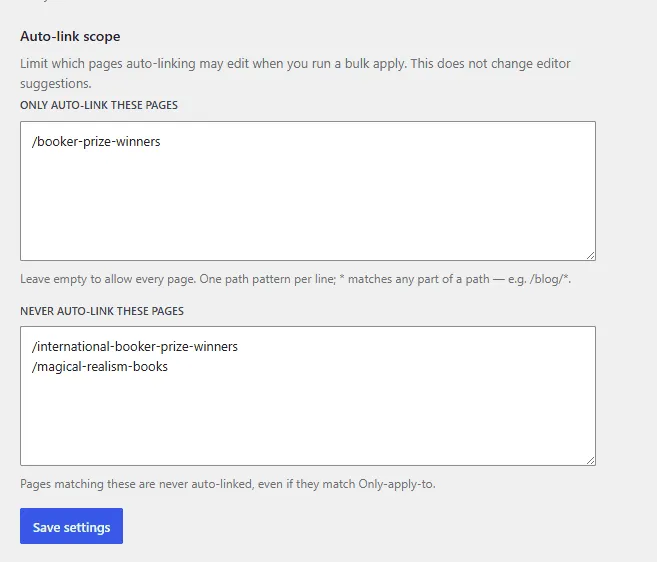
Two site-wide path lists — Only auto-link these
pages and Never auto-link these
pages — control which source pages bulk apply may write. Leave the only-list empty to
allow every page. A * matches any part of a path, for
example /blog/*. Never-list matches win.
Matching is deterministic against the page path. There is no HTTP lookup. Scope does not change editor suggestions — it only bounds bulk apply.
Link Health
Broken internal links to unpublished, trashed, or missing pages
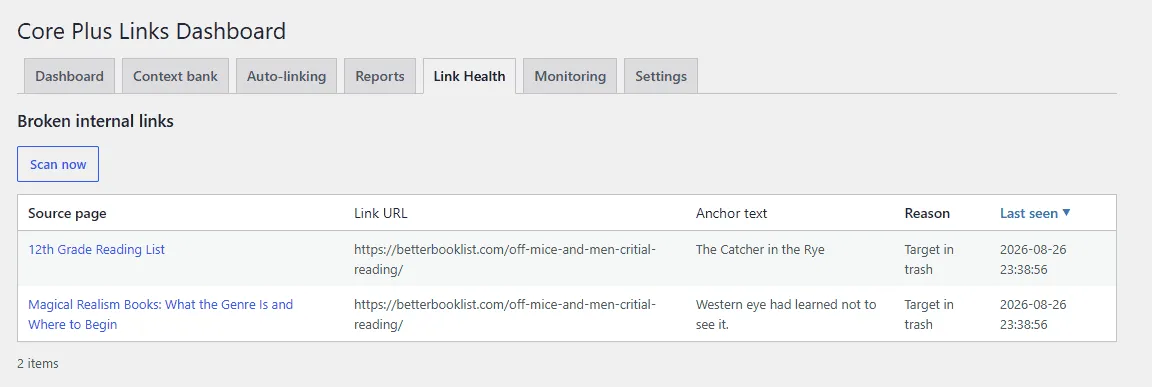
Link Health reports internal links whose targets are unpublished, in trash, or missing. Run a manual scan from the admin screen. Jobs run in the background, and drain in the admin request on quiet sites.
Core Plus Links does not crawl the public internet and does not HTTP-check external URLs.
Unresolved short links such as /go/ affiliate URLs are not
reported as broken. External HTTP checking and scheduled scans are Upcoming in Pro.
What Link Health checks, and what it does not.
Operations
Indexing runs in the background, never on page load
Indexing runs as a background job, not during page loads. Suggestions are served from the local index. Reindexing can be scheduled, and job health can be monitored from the admin.
On sites where background jobs depend on WP-Cron and traffic is low, indexing can stall. See troubleshooting for what to check.
Free and Pro
Free is complete. Pro adds more.
Core+ Links Free is the complete deterministic product — posts and pages, no custom fields. Core+ Links Pro (Upcoming) adds custom post types, custom fields, AI-assisted matching, and external HTTP checking as a separate product, not features withheld from Free.
| Feature | Free | Pro |
|---|---|---|
| At a glance | ||
| Deterministic ranking on your install | Yes | Yes |
| Posts and pages | Yes | Yes |
| Auto-linking (review, then apply) | Yes | Yes |
| Change history with one-click undo | Yes | Yes |
| Auto-link scope path lists | Yes | Yes |
| Link Health (internal unpublished, trashed, missing) | Yes | Yes |
| Custom post types | No | Upcoming |
| Custom fields | No | Upcoming |
| AI-assisted matching (BYOK) | No | Upcoming |
| External / HTTP broken-link checking | No | Upcoming |
| Orphan and underlinked reports | Yes | Yes |
Free is not a trial. Core Plus Links is the complete free plugin — deterministic and local by design, not a limited preview of Pro.
Pro
What Pro adds
Custom post type indexing, custom field support, AI-assisted matching through your own provider key, external HTTP broken-link checking, scheduled scans, and scheduled auto-link apply. All Upcoming.
Free is not a trial. Core Plus Links is the complete free plugin — deterministic and local by design, not a limited preview of Pro.
Try Core+ Links on your own site
Install, run the first index, open a post, interlink with other posts.